CSP, CSS and caching
Disclaimers: I’m not really a web developer. I have gone over the top and done things The Hard Way. You have been warned.
I have vague memories from when I last did web stuff. Google had a speed tester. 'use strict;' was gaining momentum. jQuery was cool. Dinosaurs roamed the earth.
To catch up for this website, I did some searches and ran some checkers, including Mozilla’s HTTP Observatory. One of the first things I found in the results was a recommendation to set up a restrictive Content Security Policy.
What’s a Content Security Policy?
Imagine a simple XSS attack: I submit a comment form containing <script>alert("pwned lol");</script>. Your website stores it. Someone else views that page, and you render the comment inside a webpage without properly santizing the HTML. The browser dutifuly executes this inline JavaScript, and your visitors get a popup telling them that they’ve been pwned. Oops.
The most obvious way to deal with this is to sanitize your inputs correctly, so you get <script>....
However, computer security is notoriously hard,[citation needed] so we can add a further defence.
Say you know that your website uses no inline JavaScript - all the JavaScript comes exclusively from external files. You can then add a Content Security Policy header which tells the users’ browser to simply refuse to execute inline JavaScript. Now even if I can break sanitization, I still can’t run inline scripts, and your users remain unpwned.
This is not restricted to JavaScript. CSP can define permitted sources for many types of resources. So for example, within our Content-Security-Policy header, we can say:
script-src 'self'to only allow JavaScript that comes from the same origin as the webpageimg-src *.example.comto only allow images that comes from any subdomain ofexample.comobject-src 'none'to block all<object>s and<embed>sstyle-src ...to control CSS- … and there are other features of CSP which you can explore at your leisure.
Google has some recommendations in a web.dev article and some slightly different ones in their online CSP evaluator. Interestingly, their sample “safe” policy doesn’t block all inline JavaScript, it just requires it to be tagged with a unique per-request nonce. This is unworkable for a static site because we don’t get the opportunity to write out the page afresh for each request with a new value. Fortunately, there’s also a hash-based method that can be used for static sites, although it is quite fiddly.
Happily, I don’t need JavaScript for anything, so I’ve just outright disabled it in my CSP.
CSS is the more interesting case, because I really do need CSS. Google doesn’t currently recommend any controls for CSS. Now CSS is increasingly powerful and CSS-based attacks are becoming more of A Thing, but - perhaps because the bulk of Google’s recommendations appear to stem from their 2016 research paper - their suggested policy doesn’t restrict it.
I decided that I really did want to restrict CSS, especially for the git repos hosted via my fork of Gitmal.
To inline or to outline?
I also decided that I didn’t want to deal with perfectly calculating hashes of each bit of CSS that I might want to include, so at some cost to my sanity, I moved all my CSS for the blog and gitmal into external files.
Should I have?
A lot of web performance resources, including Google’s, encourage you to put render-blocking resources like CSS inline because it allows the page to be rendered without blocking on additional HTTP requests. You also see people suggesting having a data: URL with a base64-encoded “gradient” version of large images while waiting for the images to download. (Here’s a cool one for Hugo from which I cribbed a fair bit of my own image support.)
Indeed, if you load up a page from this website in Google’s web interface to PageSpeed Insights, Google suggests removing render blocking requests by deferring or inlining:
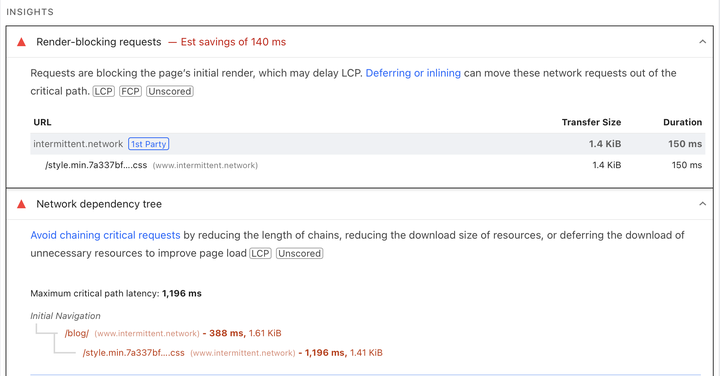
However, there’s a critical detail elsewhere on the page:

In small print in the bottom left-hand corner, we see that this is measuring an initial page load. It assumes that none of the resources can be served from the browser cache. That makes sense for some sites - perhaps most sites - but it means that this analysis will overstate the impact of having an external CSS or JavaScript resource if it’s cacheable, and a visitor visits multiple pages that use it.
For example, consider a web rendering of a git repository, such as my fork of gitmal rendered with my fork of gitmal.
If you visit just one page, then yes:
- inline: you only need 1 request for the HTML with inline CSS
- outline: you need 2 requests, one for HTML and then one for the stylesheet, delaying rendering
However, if you click around the repository, the calculation swaps:
- inline: each page includes the a set of styles, which must be transmitted each time and which are largely duplicated
- outline: each subsequent page only includes the HTML, and the browser loads the stylesheet from memory
So as well as being simpler, at some point, outlining eventually works out to be less download overall. (The original gitmal implementation actually had no external CSS, and inlined a fair bit of common CSS into each page - so this could add up quite quickly!)
Now admittedly, for a lot of websites the bounce rate is high and the modal number of pages viewed is 1. From a performance point of view, you’re better off inlining in that case. No doubt the blog part of intermittent.network will also have this property. But nevertheless, I’m sticking with external CSS!
How do we ensure our content can be cached?
Once we split the CSS or JS out into their own files, we have a couple of choices.
The simplest thing is to include a version or a the hash of your files in their name, and use Cache-Control to serve them with a long lifespan and tag them as immutable. For example, say you have a file called e.g. style.min.7a337bf326ff.css that’s served with the header Cache-Control: max-age=31536000, immutable. A browser knows that this file is good for a year, and that it’s never going to change, so there’s no need to revalidate it within the year.
I hacked up Gitmal to generate stylesheets named this way, and with Hugo’s asset pipelines it’s even easier.
You could also - depending on your CDN - not rename files but instead serve them with a cache-control header that keeps them alive a shorter time in the browser but allows them to live a long time on the CDN (e.g. with s-maxage). When the files change, you could issue a purge to get the CDN to update them. This will require a round trip from the browser to the CDN in at least slightly more cases.
Conclusion
- Set up a strong CSP. Any modern web framework should support it out of the box or be able to support it with a fairly minimal amount of tomfoolery.
- Outline as much of your JavaScript and CSS as you can get away with. Serve them with long lifetimes and
immutable. - Check the settings for your web performance measurements!
Postscript: Is there any point in CSP for a static website at all?
There is no dynamic content on this website, so XSS can’t really exist. Likewise, there’s nothing on this site to clickjack. So I guess, strictly speaking, it’s difficult to figure out how a CSP really protects anyone.
Having said that, there are reasons to do it anyway:
- I am a big fan of best practices! Even if I’m going to be the only person running my C code, I’m still not going to use
gets()! - If I do ever support dynamic or less-trusted data, I’d rather start protected rather than having to start from scratch later!